Log In to Tiki Taka Casino Online — Fast, Secure Account Access

Everything you need to sign in to Tiki Taka Casino quickly and securely - where to find the login button, how to reset a forgotten password, what to do if your account is locked, and how the session works across devices. This guide covers the full login flow for UK players using the web browser or mobile version.

Match up to £425 with 200 bonus spins
Get Startedwith bonus

Why Logging In Matters at Tiki Taka

Your Tiki Taka Casino login is the gateway to every feature that requires a real-money account: depositing funds in GBP, claiming the welcome bonus, viewing your game history and requesting withdrawals. Without an active session, you can browse the lobby and try demo games, but all personal account functions stay locked behind authentication.

The platform launched in August 2024 and runs under a PAGCOR licence (no. 22-0025/d6v95), operated by Liernin Enterprises Ltd. All login traffic is protected by TLS 1.2 and an active SSL certificate, meaning your credentials are encrypted end-to-end every time you sign in.

Key things your logged-in session unlocks:

  • Real-money play across 6,000+ games from 90+ providers
  • Deposit and withdrawal via 20+ payment methods including Visa, Mastercard and crypto
  • Manual activation of bonuses in the 'My Bonuses' section
  • Access to VIP levels, the Coin Shop and Bonus Crab mini-game
  • Sports betting on 30+ sports via the BTI sportsbook
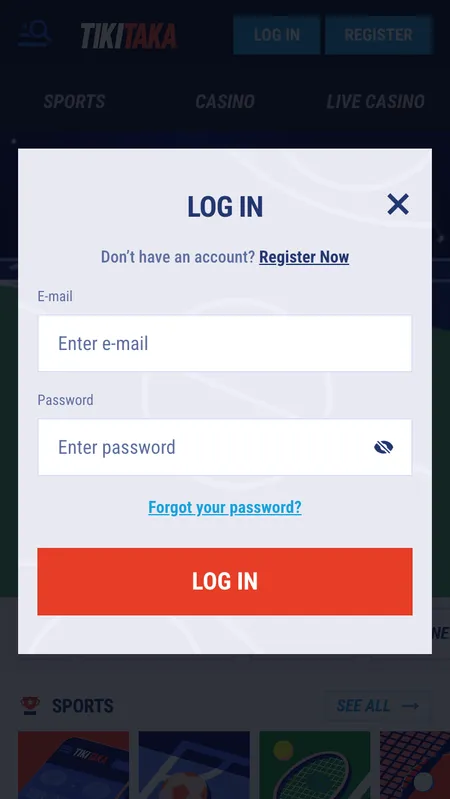
Tiki Taka Casino login form on screen

The Tiki Taka login screen shows fields for email and password, plus a 'Forgot password' link below the sign-in button.

Where to Find the Login Button

On desktop, the 'Login' button sits in the top-right corner of every page - visible before and after scrolling. On mobile, the same button appears in the top-right of the responsive header; no hamburger menu needed.

The button is always accessible regardless of which section you are browsing: Casino, Live Casino, Sports or Promotions. If you are already on the homepage, the button is the first interactive element in the header after the logo.

On the mobile browser version (no separate app is available), the header collapses to a compact bar but retains the Login shortcut. There is no difference in functionality between desktop and mobile login - both connect to the same session system.

Go to Tiki Taka Casino

How to Sign In: Step by Step

  1. Tiki Taka login form

    Step 1 - Open the login form. Click 'Login' in the top-right corner of any page. A sign-in panel opens with two fields: email address and password.

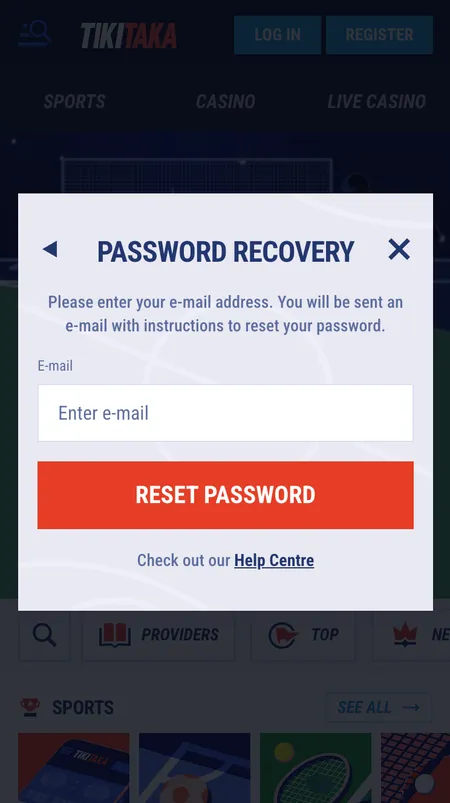
  2. Tiki Taka password reset screen

    Step 2 - Enter credentials or reset password. Type the email and password you set at registration. If you have forgotten the password, click 'Forgot Password' directly below the password field - see the reset section further down this page.

Login Methods Supported

Tiki Taka Casino uses email and password as the primary authentication method. There is no social login (Google, Facebook) and no phone-number OTP login at this time. The available entry points are:

Method Available Notes
Email and password Yes Primary method for all accounts
Social login No Not supported
Phone number login No Phone used for KYC, not login
Mobile browser Yes Full functionality, no app required

If you registered with a UK address and selected GBP as your currency, the same email and password work identically in the mobile browser on Android and iOS.

Recovering a Forgotten Password

If your password is not working, the reset flow takes under two minutes:

  1. Click 'Forgot Password' on the login panel.
  2. Enter the email address linked to your account.
  3. Tiki Taka sends a reset link to that address.
  4. Click the link in the email and set a new password (minimum 8 characters, including numbers and symbols).
  5. Sign in with the new credentials.

If the reset email does not arrive within five minutes, check your spam folder. If the address you entered is not recognised, it means the account was registered under a different email - contact 24/7 live chat to recover access.

Password reset form at Tiki Taka Casino

Enter your registered email to receive a reset link. The link expires after a short period, so use it promptly.

Tiki Taka Casino support is available 24/7 via live chat. If you are locked out of your account or the reset email is not arriving, an agent can verify your identity and assist with account recovery.

Open Tiki Taka Casino

Mobile Login: Browser vs App

Tiki Taka does not offer a dedicated Android or iOS app. The full platform runs in the mobile browser on any device - Android, iOS or Windows Phone. The login experience in the browser is identical to desktop:

  • The login button appears in the top-right of the mobile header.
  • After authentication, all account sections load: balance, bonuses, transaction history, live chat.
  • Deposits and withdrawals work through the same mobile session.
  • The live casino and sportsbook are fully accessible without switching to a desktop.

The mobile site adapts to different screen sizes automatically. High-quality graphics and smooth navigation are maintained on 4G and Wi-Fi connections. If you want to learn more about the mobile experience, see the app page.

Session Persistence and Auto-Login

After signing in, the browser stores your session cookie. This means you will remain logged in when you return to the site in the same browser without clearing cookies or cache. The session ends automatically if you:

  • Click the 'Logout' button manually.
  • Clear browser cookies or use private/incognito mode.
  • Are inactive for an extended period (session timeout).

On shared or public computers, always log out manually after your session and avoid saving the password in the browser.

Logging In on Different Devices

Your Tiki Taka account is accessible from any device with a browser. There is no device limit for viewing the account, but the platform enforces one account per person, household, postal address and IP address. Simultaneous sessions on multiple devices are generally allowed; the same account simply reflects the live balance across sessions.

Device Browser Login Notes
Desktop (Windows, Mac) Yes Full interface
Android mobile browser Yes Responsive layout
iOS Safari Yes Full feature parity
Tablet browser Yes Adapts to screen size

Troubleshooting Login Problems

Common issues and their fixes:

  • Wrong password: Use the 'Forgot Password' link to reset. Passwords are case-sensitive.
  • Account not found: Check the email for typos; you may have registered under a different address.
  • Account locked: Multiple failed login attempts can trigger a temporary lock. Contact live chat to unlock.
  • Page not loading: Clear browser cache or try a different browser. Check that your connection is stable.
  • Bonus not showing after login: Go to 'My Bonuses' in your profile and activate manually.

If none of the above resolves the issue, the 24/7 live chat responds within a few minutes and can check the account status directly.

Tiki Taka Casino does not hold a UKGC licence. It operates under PAGCOR licence no. 22-0025/d6v95, issued to Liernin Enterprises Ltd. UK players can register and play, but the platform is an offshore operator not covered by UKGC protections.

Visit Tiki Taka Casino

Two-Factor Authentication (2FA)

Tiki Taka Casino does not currently advertise a standard 2FA (TOTP or SMS code) as part of the login flow. Account security relies on the email-and-password combination plus TLS 1.2 encryption for all connections. If 2FA becomes available, it would typically be enabled under account security settings.

For now, the recommended security practices are:

  • Use a strong, unique password (minimum 8 characters, mix of letters, numbers and symbols).
  • Do not reuse the password from other sites.
  • Do not share your login credentials with anyone.
  • Log out when using a shared or public device.

Security of the Login Process

Every login at Tiki Taka is routed through TLS 1.2 with an active SSL certificate. This encrypts credentials in transit so they cannot be intercepted on public networks. The platform also applies AML policies and due diligence checks, which means unusual login patterns or location changes may trigger additional verification requests.

The casino enforces one account per person, household, IP address, phone number and email. Creating a second account to claim bonuses again is a breach of the terms and will result in both accounts being closed with balances forfeited.

What You Can Do After Logging In

Once authenticated, your dashboard shows:

  • Current balance (real money and bonus funds shown separately)
  • Active bonuses and wagering progress in 'My Bonuses'
  • Transaction history and game history
  • KYC verification status and document upload
  • Responsible gambling tools: deposit limits, session reminders, self-exclusion

Real money is always played first; your bonus balance activates only when the real-money balance reaches zero. The maximum bet while a bonus is active is £4.25.

Login and KYC Verification

You can log in and play immediately after confirming your email at registration. KYC is not required to start playing, but it becomes mandatory before your first withdrawal is processed. When you request a withdrawal, the casino will ask for:

  • A government-issued ID (passport or driving licence)
  • Proof of address

Verification takes up to 48 hours. Until it is complete, withdrawal requests remain pending. It is worth submitting documents early - you can upload them via the verification section of your profile while still logged in.

Login and Payment Operations

Deposits can be made immediately after logging in via 20+ methods including Visa, Mastercard, Bitcoin, Litecoin, Dogecoin, Skrill, Neteller, MiFinity and Revolut. The minimum deposit is £10 for most methods (£30 for Bitcoin).

Withdrawals are processed back to the same method used for the deposit. Daily withdrawal limit is £500 for standard accounts; VIP levels 3-5 have higher limits. All payment pages are accessible directly from your logged-in account under the Payments section.

For a full breakdown of supported methods and limits, visit the payment methods page.

Ready to play? Sign in to Tiki Taka Casino and access 6,000+ games, sports betting and your personal bonuses.

Login FAQ

Where is the login button on Tiki Taka Casino?

The 'Login' button is in the top-right corner of every page, both on desktop and in the mobile browser. It is visible without scrolling.

I forgot my password - how do I reset it?

Click 'Forgot Password' on the login panel, enter your registered email, and follow the link sent to your inbox. The new password must be at least 8 characters and include numbers and symbols.

Does Tiki Taka Casino have a login app?

There is no dedicated Android or iOS app. The full login and account experience is available through the mobile browser on any device.

Why is my account locked after failed login attempts?

Multiple incorrect password entries can trigger a temporary lock as a security measure. Contact live chat 24/7 to unlock your account.

Can I stay logged in between visits?

Yes. The browser stores your session cookie so you remain logged in when you return, as long as you have not cleared cookies or used incognito mode.

Is my login secure on a mobile network?

Yes. All connections use TLS 1.2 with an active SSL certificate. However, avoid saving your password on public or shared devices and log out manually after each session.

Can I log in from two devices at the same time?

You can access your account from multiple devices using the same credentials. The balance updates in real time across sessions. Only one account per person is allowed under the terms.

What do I do if the login page is not loading?

Clear your browser cache or try a different browser. Check your internet connection. If the problem persists, contact 24/7 live chat for assistance.

Do I need to verify my identity to log in?

No. KYC verification is not required to log in or play. It becomes mandatory only when you request your first withdrawal.

How do I log out from all devices?

Use the logout function in your account settings or profile menu. To force-end all active sessions, contact the support team via live chat.